

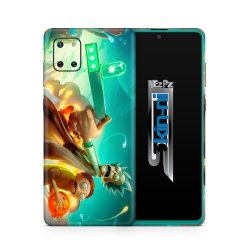
Samsung Galaxy Note 10 Lite Decal Skin: Rick And Morty
Offer

Overview
The Samsung Galaxy Note 10 Lite Decal Skin is a vinyl skin that is designed to be applied to the device. The skin is made from a premium vinyl that has a special no bubble, no residue adhesive back. The Vinyl is protected with a cold lamination film that comes in a Matt or Gloss finish depending on material availability. Every sticker is measured, to ensure our skins are cut to your devices exact specifications and will fit perfectly first time. Excellent print quality. Skins are printed with full colour ink on state of the art professional printers. The skin is designed to protect the device from scratches and make the device stand out. It is easy to apply and remove. The skin is cut to fit the device perfectly. The skin is heated before application to ensure a smooth surface. The skin is pressure-bonded to the device to ensure a perfect fit.
- Premium Vinyl Material
- Special No Bubble, No Residue Adhesive Back
- Cold Lamination Film
- Printed with Full Colour Ink
- Fits Perfectly First Time
Offer
Prices last checked


Specifications
- Brand
- Samsung
- Manufacturer
- Samsung
- Model Number
- SAMSUNGNOTE10LRAM
Description
SkinNit Just got better! New high-quality Vinyl used for better results. Our skins will not lift or come off unless you take them off. Please make sure you follow the installation instructions below to avoid issues. Please make sure you select the correct model for your device. If you have any issues with your skin please get in touch with our support team at SkinNit.
SkinNit the easiest way to protect and style your phone device. Our decal skins for phones are made from a premium vinyl that has a special no bubble, no residue adhesive back making them easy to apply and remove. The Vinyl is protected with a cold lamination film that comes in a Matt or Gloss finish depending on material availability.
Every sticker is measured, to ensure our skins are cut to your devices exact specifications and will fit perfectly first time. Excellent print quality. Skins are printed with full colour ink on state of the art professional printers. What is a skin? Think of a skin as a kind of Armor for your device.
Not only will it protect your device from scratches, but it will also make your device stand out and reflect your personality. Don't be like the rest of the crowd and own a boring standard device. SkinNit and stand out like never before! Why skin your device with SkinNit? OUR SKINS ARE STRONG SkinNit skins are made from premium vehicle grade vinyl.
The same vinyl they use on cars. The Vinyl is then protected with a cold lamination film that comes in a Matt or Gloss finish depending on material availability. Our skins are super strong will stand the test of time. APPLYING YOUR SKIN SkinNit skins have a special no bubble, no residue adhesive back making them easy to apply.
If you can apply a sticker to a sticker book, then you can apply a SkinNit Skin. It's really that simple! Ez Pz (Easy Peazy) REMOVING YOUR SKIN The only reason you would want to do this is so you can change the design of your skin. We at CC Entertainment can't think of another reason why you would want to remove your awesome skin.
But yes, removing your SkinNit skin is simple and we promise no residue will be left behind. SKIN CUT SkinNit skins are super thin and won't cause any damage or overheating to your device. Our Skins are perfectly cut every time to ensure no air-vents, cable inputs or docking stations are affected in any way.
SkinNit Step-By-Step Installation Guide: 1. Prep your worktable: You need a flat area. Make sure it's clean. Avoid any dust, stray hairs and food from last night's dinner. 2. Prep your hands: Get up and wash your hands with soap and warm water to remove any natural oils and grease from your hands. Dry your hands thoroughly. 3.
Prep your device: The surface of your device needs to be clean, so grab your damp towel and wipe your device down to remove any dirt and grit. Do not use any cleaning detergents as they may affect the glue from bonding - only use water. 4. Dry your device: Using your dry towel, make sure there's no water left on your device.
Let it sit for a few minutes to make sure any leftover water has evaporated. 5. Get the skin ready: Our skins bond via heat activation you can use a hairdryer to warm the skin and the console surface before applying this is especially necessary in the colder winter season. The idea is not to overheat or burn the skin it is to get the surface area warm and the skin warm before applying.
Leave a safe distance between the hairdryer and the skin when doing this process. 6. Using your safety pin or paperclip, carefully remove any cut-outs of the skin. We've found it's best to do this while the skin is still on the backing. 7. Peel & Apply: Now you can gently peel your skin off its backing and apply it to your device.
Start at one edge and use the other edges as a guide to get your skin perfectly lined up. Take your time. If you come across any air bubbles or wrinkles during the process, gently run your finger over them and the channeled adhesive will allow the bubbles to be pressed out. Pressure will help bond your skin so be sure to push down hard on all areas especially on the corners to ensu
Reviews and questions
Related products
🛍️ More Products You'll Love
Loading similar products...
Questions about Samsung Galaxy Note 10 Lite Decal Skin: Rick And Morty
What is the cheapest price for Samsung Galaxy Note 10 Lite Decal Skin: Rick And Morty?
The lowest price for Samsung Galaxy Note 10 Lite Decal Skin: Rick And Morty on PriceCheck is R179.
Where can I buy Samsung Galaxy Note 10 Lite Decal Skin: Rick And Morty?
The cheapest offer right now is R179 at takealot.com.
Is Samsung Galaxy Note 10 Lite Decal Skin: Rick And Morty in stock?
Samsung Galaxy Note 10 Lite Decal Skin: Rick And Morty is listed by one shop on PriceCheck. Stock changes quickly, so check availability on the shop's website before you buy.
Who makes Samsung Galaxy Note 10 Lite Decal Skin: Rick And Morty?
Samsung Galaxy Note 10 Lite Decal Skin: Rick And Morty is made by Samsung. More Samsung products
How do I know when Samsung Galaxy Note 10 Lite Decal Skin: Rick And Morty gets cheaper?
Set a price alert on this page and PriceCheck will email you when the price drops. The price history chart shows how the price has moved over the past year.