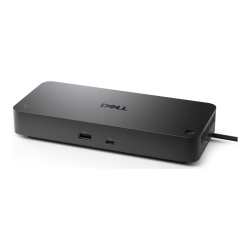

| Brand | Dell |
| Manufacturer | Dell |
| Model Number | 210-BRFN |
Dell Pro SD25TB5 Thunderbolt 5 Smart Docking Station 210-BRFN Conquer intense workloads with versatile Thunderbolt 5 smart dock, delivering up to 300W of future-ready power and remote management capabilities. Features and Design Future-proof your productivity Maximise your AI PC productivity on the industrys first, and most powerful, Thunderbolt 5 smart dock, built for seamless multitasking using Gen AI tools across up to four 4K 120Hz displays.
Featuring extended power range, this smart dock delivers up to 300W of power over a single USB-C cable to meet the demands of the highest performance AI PCs. Modern ports ensure a wide range of peripheral connectivity. More manageable and secure Elevate the IT management experience by directly managing your smart docks from the Dell Device Management Console no PC connection or software required.
Most manageable commercial dock Reduce IT efforts by scheduling updates during off-hours, while ensuring fleetwide firmware compliance and eliminating end user interruptions.Learn more. Most secure smart dock Keep users working confidently with enterprise-grade WPA-3 192-bit encryption for secure Wi-Fi communication.
Safeguard your sensitive data with tamper-resistant, hardware-based encryption built into your Dell Pro Smart Dock. Effortless maintenance Remotely configure, deploy and update Dell Pro Smart Docks over Wi-Fiwithout the user connecting to a PC. Unlock out-of-band management on select Intel vProPCs with IntelActive Management Technology (IntelAMT) over Thunderbolt from the connected dock.
Connect your way Configure your workspace to your liking with an ambidextrous USB-C cablethat can be routed left or right. Designed for sustainability The Dell Pro Thunderbolt 5 Smart Dock is built with at least 65% post-consumer recycled materialsand packaged with 100% recycled or renewable packaging.
Technical Specification Product:Dell Pro Thunderbolt 5 Smart Dock - SD25TB5 Connectivity Technology:Wired Device Supported:Notebook Ethernet Technology:2.5 Gigabit Ethernet Host Interface:Thunderbolt 5 Cable Length:83 cm Thunderbolt Version:5 DisplayPort Version:2.1 HDMI Version:2.1 Features Power Delivery Pass-through LED Power Indicator Management Features WLAN to LAN Switch Port Disablement Dell Command Update (DCU) Intel AMT over Thunderbolt with select Intel vPro PCs Kernel Direct Memory Access (DMA) Protection Wake-on-LAN Dock Power Button Sync PXE Boot MAC Address Pass-through Number of Displays Supported:4 Screen Mode Supported QHD @ 60Hz WQHD @ 60Hz 4K @ 60Hz 5K @ 60Hz 6K @ 60Hz 8K @ 60Hz 4K @ 120Hz Supported Resolutions 7680 x 4320 6144 x 3456 5120 x 2160 3840 x 2160 3440 x 1440 2560 x 1440 Maximum Data Transfer Rate:1.25 GB/s Security Slot Type Noble Wedge Security Slot Kensington Security Slot Power Delivery Details 4x USB-A 3.2 Gen 2 (4.5W each) 1x USB-C 3.2 Gen 2 (15W) 1x USB-C Multi-function DisplayPort (7.5W) 2x Thunderbolt 5 (15W each) All deliver power with or without PC Power Delivery 300W (Dell Systems) 240W (non-Dell Systems) Video Resolution Details QHD - 60 Hz (Quad Display) WQHD - 60 Hz (Triple Display) 4K - 60 Hz (Dual Display) 5K - 60 Hz (Single Display) 4K - 60 Hz (Quad Display) 4K - 60 Hz (Triple Display) 6K - 60 Hz (Dual Display) 8K - 60 Hz (Single Display) 4K - 120 Hz (Quad Display) 4K - 120 Hz (Triple Display) Kensington Security Slot:Yes Maximum Power Supply Wattage:330 W Weight:632 g(Approximate) Warranty: 3-yearAdvanced exchange service Ports USB-A 3.2 Gen 2 with PowerShare USB-C 3.2 Gen 2 USB-A 3.2 Gen 2 with PowerShare USB-A 3.2 Gen 2 with PowerShare USB-A 3.2 Gen 2 with PowerShare HDMI 2.1 DisplayPort 2.1 DisplayPort 2.1 USB-C 3.2 Gen 2 Multifunction DisplayPort 2.1 Thunderbolt 5 Thunderbolt 5 2.5 Gigabit Ethernet (RJ45) Power In
 Related Products
Loading similar products...
Stay informed about the best deals and price drops. Choose which notifications you'd like to receive from PriceCheck.


