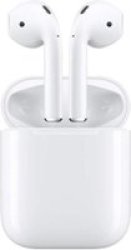
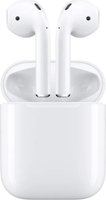
| Brand | Apple |
| Manufacturer | Apple |
| Model Number | 0190199098565 |
Your right-hand Siri.
Need a hand? Simply say Hey Siri for assistance without having to reach for your iPhone. And with Announce Notifications, Siri can automatically read important notifications from Messages, Phone, Calendar, Reminders, and more as they arrive. You can choose which contacts you hear notifications from, and Siri won't interrupt you if you're on a call or sharing a song.
Performance you'll want tohear.
Powered by the Apple H1 headphone chip, AirPods deliver a faster and more stable wireless connection to your devices - up to 2x faster when switching between active devices, and a 1.5x faster connection time for phone calls.
The H1 chip also drives voice-enabled Siri access and delivers up to 30 percent lower gaming latency. So whether you're playing games, listening to music, or enjoying podcasts, you'll experience higher-quality sound.
Lay itdown,chargeitup.
With the optional Wireless Charging Case, charging is as simple as placing the AirPods case on a Qi-certified charging mat.
That's it. The LED indicator on the front of the case lets you know that your AirPods are charging. And when you're away from a charging mat, you can use the Lightning port to charge.
The power of 24-hour batterylife.
AirPods deliver an industry-leading 5 hours of listening time - and now up to 3 hours of talk time - all on one charge.
And they're made to keep up with you, thanks to a charging case that holds multiple charges for more than 24 hours of listening time. Need a quick charge? Just put AirPods back in the case for 15 minutes to get up to 3 hours of listening time or up to 2 hours of talk time. To check the battery, hold the AirPods next to your iPhone or ask Siri How's the battery on my AirPods?
And when your AirPods need charging, a notification conveniently appears on your iPhone.
Instantsetup. Easylistening.
AirPods connect immediately, and sound seamlessly switches between your iPhone, Apple Watch, Mac, iPad, and AppleTV.Easy setup, magicalresults.
Two can play this song.
With Audio Sharing, you can easily share a song, podcast, or other audio stream between two sets of AirPods - each with independent volume control.
If your AirPods are in their case, just bring them close to the iPhone or iPad you want to share with and connect in a tap. And if your AirPods are in your ears, bring your iPhone close to the device instead.
Compatible Devices :
iPhone:
iPhone 15,
iPhone 6s to iPhone 15/Pro/Max
Apple TV:
4K (3rd Generation),
4K (2nd Generation),
4K (1st Generation),
HD,
iPad:
(10th Generation),
(9th Generation),
(8th Generation),
(7th Generation),
(6th Generation),
(5th Generation),
Air 11-inch (M2),
Air 13-inch (M2),
Air (5th Generation),
Air (4th Generation),
Air (3rd Generation),
Air 2, iPad mini (6th Generation),
mini (5th Generation),
mini 4,
Pro 13-inch (M4),
Pro 12.9-inch (6th Generation),
Pro 12.9-inch (5th Generation) ,
Pro 12.9-inch (4th Generation),
Pro 12.9-inch (3rd Generation),
Pro 12-inch (1st and 2nd Generation) ,
Pro 11-inch (M4),
Pro 11-inch (4th Generation),
Pro 11-inch (3rd Generation),
Pro 11-inch (2nd Generation),
Pro 11-inch (1st Generation),
Pro 10.5-inch , iPad Pro 9.7-inch,
iPod:
iPod Touch,
MacBook:
Air 15 (M3 Chip),
Air 13 (M3 Chip),
15 (M2 Chip),
13 (M2 Chip),
(M1 Chip),
(Retina),
Air (Non-Retina),
Air 11, MacBook Pro 13 (Retina Display),
Pro 13 (M2 Chip),
Pro 13 (M1 Chip),
Pro 13 (USB-C) 2020, MacBook Pro 13 (Touch Bar),
Pro 13 (2017),
Pro 13,
Pro 14 (2023),
Pro 14 (2021),
Pro 16 (2023),
Pro 16 (2021),
Pro 16 (2019),
Pro 15 (Touch Bar),
Pro 15 (Retina Display), MacBook, Mac Studio,
Mac:
 Related Products
Loading similar products...

Stay informed about the best deals and price drops. Choose which notifications you'd like to receive from PriceCheck.


