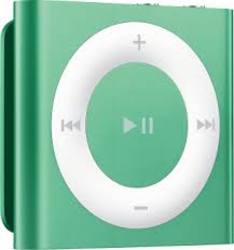
| Family Line | iPod shuffle |
| Generation | 5th |
| Manufacturer | Apple |
| Memory Size | 2 GB |
| Memory Type | Flash |
| Model Number | MD776 |
| Music Playback Formats | MP3, OGG, FLAC, WMA, secure WMA, WAV, Audible, MPEG4 |
| Radio | No |
| Video | No |
Sleek, anodised aluminium. Eight gorgeous colours.
Its main body is crafted from a single piece of aluminium, so iPod shuffle feels solid, sleek and durable. And the colour palette makes it the perfect fashion accessory.
Hundreds of songs to go.
Never leave a favourite tune behind.
Along with up to 15 hours of battery life,1 iPod shuffle gives you 2GB of storage capacity, enough for hundreds of songs. That’s plenty of room for the essential songs of your workout or commute. And for multiple playlists, podcasts and audiobooks too.
Goes anywhere. And with anything.
iPod shuffle isn’t just portable.
It’s wearable too. Clip it to your shirt, jacket, workout gear, backpack or purse strap, and it stays put — whether you’re running an errand or running round the track.
Control your music with just a click.
The big, clickable control pad on the front of iPod shuffle makes it easy to see and use the music controls.
Press the centre button to play and pause. Press the outer buttons to skip forward or back and adjust volume. Click, click, click. It’s music to your fingers.
Play it your way.
Maybe you’re the spontaneous type. Or maybe you prefer a little order. Just flip the shuffle switch to suit your listening style.
Flip it to the left, and you’ll hear your music in a refreshingly random way. Flip it to the middle, and your songs play in order. Or flip to the right to turn iPod shuffle off.
Give your songs a voice.
Say you’re listening to a song and want to know the title or the artist.
Just press the VoiceOver button on top of your iPod shuffle, and it tells you. You can even use VoiceOver to hear the names of playlists and switch between them. And if your battery needs charging, VoiceOver tells you that too.
It speaks your language.
A French love song. A Spanish bolero.
An Italian cantata. Your music library has songs from all over the world. That’s why VoiceOver speaks 29 different languages. So it can tell you song titles and artists in their native tongues or any language you choose.
Sync to your heart’s content.
iTunes on your Mac or PC makes it easy to load up your iPod shuffle.
Just choose the playlists, audiobooks, podcasts and other audio files you want, then sync.
When one playlist isn’t enough.
You probably have multiple playlists in iTunes on your computer. One for your commute. One for the gym. Sync those playlists to iPod shuffle, and you can play the perfect mix for whatever mood strikes.
 Related Products
You can find similar offers for Apple 5th Generation products with our WhatsApp search.
Stay informed about the best deals and price drops. Choose which notifications you'd like to receive from PriceCheck.